Home
Home  Navigation


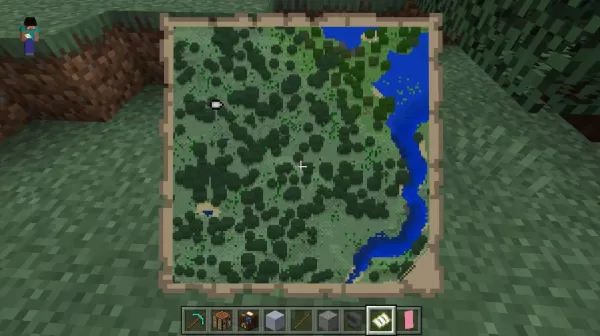
Maps in Minecraft are more than just tools – they are essential for mastering the vast and constantly evolving world. Whether navigating unfamiliar biomes, planning large-scale survival projects, or creating custom adventures, maps allow you to record your journey step by step. Unlike many games, Minecraft doesn't provide a minimap or default quest tracker, making map knowledge vital for both newcomers and experienced explorers. This comprehensive guide covers everything about Minecraft maps – from crafting and scaling to adding markers and exploring custom downloads – so you never lose your bearings.
If you're just beginning and need help setting up your game, this guide on how to play Minecraft on PC and Mac takes you through installation and platform setup. Once you're in the game, mastering survival mechanics is crucial, especially when mapping extensive areas. Don’t miss the Minecraft Survival Guide for tips on managing hunger, crafting tools, and staying alive during your expeditions.
What Is a Map in Minecraft and Why It Matters
Maps are vital survival and exploration tools in Minecraft that let players document and navigate the massive, procedurally generated world. Whether you're surviving solo or collaborating on creative builds, knowing how to craft, use, and optimize maps significantly improves gameplay. The absence of default waypoints or mini-maps makes mastering maps especially important.
Custom Maps and Adventure Map Downloads
Beyond survival, Minecraft supports a rich ecosystem of community-created custom maps, including parkour courses, puzzles, role-playing quests, and narrative-driven adventures built with command blocks and resource packs. You can download these from trusted sources like Planet Minecraft, MinecraftMaps.com, or CurseForge, then install them into your saves folder for standalone play. Many top custom maps offer hours of high-quality content that rivals official DLC.
Why Maps Are Essential in Minecraft
Maps in Minecraft are powerful tools for exploration, creativity, and strategy. Whether creating a personal guide or a server-wide navigation system, understanding maps is key to long-term survival and impressive builds. Mastering them lets you document, share, and control every part of the game—deepening the immersive sandbox experience. You can also enhance your game by playing Minecraft on a larger PC or laptop screen using BlueStacks with keyboard and mouse controls.
 Latest Articles








 Latest Games