Home
Home  Navigation


Hazard Operations mode, also known as Operations or Extraction mode in Delta Force, is an intense survival challenge that combines player combat, unpredictable AI, and stringent resource management. Whether you're entering the fray solo or with a squad, every decision is crucial. In this high-stakes environment, even minor errors can have significant consequences, as failure means losing all you've brought into the game.
This guide aims to equip new players with the knowledge needed to survive their initial forays into Operations mode. From smart gear choices to stealth tactics, selecting the right Operative, and knowing when to engage or retreat, these foundational tips will not only help you stay alive but also maximize the gains from each run.
Getting Ready for Your First Raid
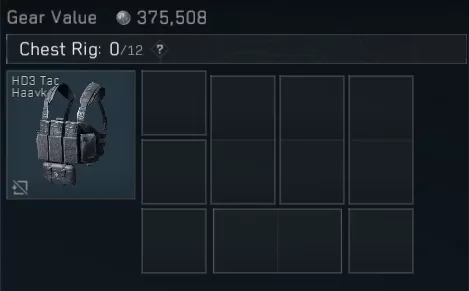
While the tutorial provides a basic overview, true preparation begins before deployment. Delta Force requires you to equip essential gear such as a helmet, body armor, a backpack, and a chest rig before you can drop in. The chest rig is particularly vital, offering quick access to critical consumables like healing items and spare ammo during intense mid-raid scenarios.
Selecting the appropriate ammunition is another frequent challenge for beginners. Each weapon requires a specific caliber, and the game distinguishes between different types rather than grouping them under general labels like "rifle" or "pistol." Opting for firearms that use the same ammo, such as a 9mm SMG and pistol, simplifies early loadouts and minimizes the risk of reload errors during combat.
The abilities of your chosen Operator can significantly influence the outcome of your engagements. Luna's shock arrows can disorient foes, Stinger's smoke provides visual cover, and Hackclaw's knife enables silent takedowns. Leverage these abilities strategically to gain an advantage without solely relying on your shooting skills.
Avoiding Common Mistakes
New players often fall into several pitfalls that can be costly. Going solo is one of the biggest errors. While Delta Force doesn't penalize solo play, it's considerably more challenging. Whenever possible, team up with a squad. If you lack friends who play, use matchmaking—it's far better than venturing alone.
Another common mistake is fixating on PvP encounters. Pursuing every enemy squad can be risky and often not worthwhile unless you're certain of victory. Prioritize looting and engage in combat only when necessary or when you're confident of winning.
Switching weapons frequently is also a bad habit to break. Stick with one gun for multiple runs to familiarize yourself with its recoil, attachments, and firing patterns. Consistency breeds confidence, which is crucial for surviving high-pressure extractions.
Build Experience Slowly
Mastery in Operations mode doesn't come overnight. Even in defeat, you're gaining valuable experience. Seasoned players often suggest adopting a low-risk approach until you're well-versed in the maps, mechanics, and enemy behavior.
An often overlooked strategy is to gather small items during a raid and store them in your Safe Box. Whether you successfully extract or not, you'll still profit from the items you've secured. Over time, these small gains can accumulate, potentially netting you thousands in value even after a failed raid.
As your earnings grow, you can afford better gear. However, resist the urge to splurge immediately. Instead, save your credits and invest in solid ammo, effective attachments, and ample healing supplies. Always maintain a reserve of gear to fall back on in case of emergencies.
With the right preparation, team coordination, and mindset, your survival rate in Operations mode will improve significantly. Stay vigilant, adopt a long-term perspective, and view every raid—even those ending in defeat—as a learning opportunity.
For the optimal gaming experience, consider playing Delta Force on PC using BlueStacks. This setup offers smoother controls, more precise aiming, and a performance boost that can be crucial during intense moments.
 Latest Articles









 Latest Games