 首頁
首頁  導航
導航



Fluid Navigation Gestures
分類:個人化 大小:7.2 MB 版本號:2.0-beta11
開發者:paprikanotfound 評分:5.0 更新日期:May 02,2026
 應用說明
應用說明
Experience the fluid navigation gestures of tomorrow, today!
*Requires ADB, root access, or a supported device*
*This app is no longer under active development*
Refresh your phone's interface with Fluid N.G, an innovative navigation gestures app inspired by Breccia's original concept.
Usage
Two primary gestures are available: 'Quick Swipe' and 'Swipe & Hold,' which can be triggered from either the bottom or side edges of your screen. Side triggers are confined to the bottom half of the display, preserving access to in-app side menus.
Actions
• Back
• Home
• Recent apps
• Toggle split screen
• Open notifications
• Open power dialog
• Open quick settings
• Launch Google search overlay
• Open keyboard selector
• Voice Search
• Launch assistant
• Launch app
• Launch shortcut
Setup
The app includes a built-in option to hide software navigation keys (if needed), but this requires either root access or a PC to grant a specific permission.
Android ADB PC/Mac instructions:
1 - Enable Developer Options in your Android settings.
2 - Enable USB Debugging.
3 - Set up ADB on your computer.
4 - Run the following ADB command to grant the permission:
adb shell pm grant com.fb.fluid android.permission.WRITE_SECURE_SETTINGS
To restore the navigation keys, simply disable FNG or execute this ADB command:
adb shell wm overscan 0,0,0,0
FluidNGPermissionGranter
This open-source tool for Windows makes it easy to grant FNG the required permissions. Download it here.
How to setup Android ADB
xda-developers - How to install adb on Windows...
Lifehacker - The easiest way to install android's adb...
TilesOrganization - How to use adb to grant permissions
Translation
Help translate FNG into your native language here.
Feedback
Telegram Group
Telegram Channel
What's New in the Latest Version 2.0-beta11
Last updated on Sep 24, 2019
Fix: Slow rotation on some devices
Fix: Triggers not working
Fix: Navigation bar not hiding in landscape mode
Fix: FNG appearing in screenshots
Fix: Navigation bar briefly visible after unlocking the device — OnePlus 9+
Fix: Volume dialog cut off
Fix: Trigger error on certain devices
Fix: Animation resetting after device reboot
 用戶評價
發表評價
Fluid Navigation Gestures 類似應用
用戶評價
發表評價
Fluid Navigation Gestures 類似應用
-
 TLauncher PE下載
v0.4.8 / 14.02M
-
 Спорт Беларуси: Tribuna.com BY下載
v7.4.2 / 21.82M
-
 FlyArt - Flyer Creator下載
2.9 / 18.70M
-
 Titan Player下載
1.2.1x / 18.60M
最新文章
-
WD Elements 14TB硬碟亞馬遜創歷史新低 Sep 16,2026
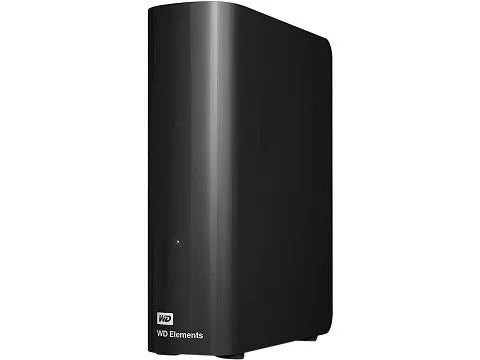
如果您正在尋找價效比高的大容量本地儲存裝置,這款 WD Elements 硬碟提供了卓越的價值。目前亞馬遜售價為199.99美元(每TB僅14.29美元),並免運費;該14TB USB 3.0桌面硬碟由亞馬遜直接發貨,而非第三方賣家。WD Elements 14TB 外接硬碟現售價199.99美元### WD Elements 14TB USB 3.0 桌面外接硬碟原價259.99美元,節省23%,亞馬遜現價199.99美元WD Elements在標準桌上型電腦尺寸內容納了龐大的14TB容量。利
作者 : Aaron 看全部
-
《明暗之間:遠征33》以12項提名重新整理遊戲大獎紀錄 Sep 14,2026
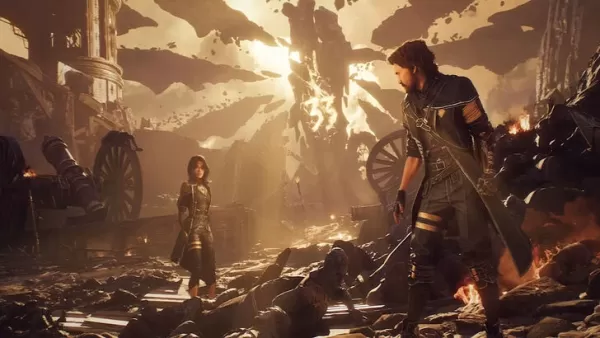
《Clair Obscur: Expedition 33》在 2025 年遊戲大獎(The Game Awards)中榮獲 10 個類別共 12 項提名!繼續閱讀以瞭解《Expedition 33》在本屆頒獎禮中獲得認可的幕後詳情。遊戲大獎提名公佈《Expedition 33》打破紀錄遊戲大獎公佈了 2025 年度最佳遊戲名單,《Clair Obscur: Expedition 33》以創紀錄的 12 項提名領跑,涵蓋 10 個不同類別。這些榮譽於 11 月 17 日的直播中揭曉,由遊戲大獎執行
作者 : Hannah 看全部
-
《紐約時報》Connections 提示與答案,11月28日 Sep 13,2026
本指南涵蓋昨天的挑戰!尋找今天的?檢視5月14日星期四的Connections提示!今天(11月28日星期五)的Connections需要提示嗎? 儘管這非常令人印象深刻,但沒人指望你在沒有任何幫助的情況下解決每日Connections謎題。事實上,這幾乎是不可能的,所以讓我們在你需要時提供一些幫助。使用一些提示並重試,或檢視下面的完整Connections解答。本指南包含:如何玩Connections11月28日星期五的Connections提示今天的Connections分組是什麼?今天的C
作者 : Logan 看全部
專題

通過我們精選的頂級移動應用程序集合,了解所有最新的體育新聞和比分! 無論您是足球狂熱者、籃球愛好者還是網球愛好者,我們都能滿足您的需求。 下載並享受 MYFM - 在線足球經理、超級足球 - 3V3、熱扣籃籃球、花樣遊泳、火箭汽車球、網球衝突、2023 年網球世界公開賽 - 體育模組、Head Soccer、Mobile Soccer League 2024 和迷你網球等遊戲。 找到您最喜歡的運動並投入其中! 此頁麵精選了適用於 Android 和 iOS 的最佳體育應用程序,提供逼真的模擬和有趣的街機風格遊戲的組合。 立即發現您最喜歡的下一個運動應用程序!



 最新應用
最新應用




 熱門應用
熱門應用





 熱門新聞
熱門新聞

- 頂級免費火角色2025:終極指南 Apr 16,2025
- 刺客信條陰影中最好的武器 Mar 22,2025
- “掌握Nerscylla:捕捉怪物獵人野生的策略” Apr 20,2025
- 在下一個 阿爾比恩Online 更新《盜賊邊境》中幫助被遺棄者和格格不入的人! Jan 09,2025
- 恐怖遊戲《昏迷 2》讓玩家陷入詭異維度 Dec 10,2024
- 隱喻與沉默的英雄:DQ 創作者暢談 RPG 趨勢 Jun 19,2022
- 是時候重回銀幕了:2024 年你錯過的電影 Jan 05,2025
- 維京生存殖民地出現在文蘭傳說中 Dec 26,2024
