Home
Home  Navigation


Splitgate 2 is one of the most anticipated games of 2025, and players are eager to dive into the sequel to the popular original. However, being in Alpha, Splitgate 2 is still under development, meaning performance issues like crashes and frame drops are expected. Optimizing your settings can significantly mitigate these problems. This guide details the best settings for maximizing framerate and minimizing input lag in Splitgate 2.
Recommended Videos
Related: What Is Splitgate 2’s Release Date?
Splitgate 2 System Requirements
Before optimizing, ensure your system meets the minimum or recommended specifications. Fortunately, Splitgate 2 isn't overly demanding.
Minimum
- Processor: Intel® Core™ i3-6100 / Core™ i5-2500K or AMD Ryzen™ 3 1200
- Memory: 8 GB RAM
- Graphics: NVIDIA® GeForce® GTX 960 or AMD Radeon™ RX 470
Recommended:
- Processor: Intel® Core™ i5-6600K / Core™ i7-4770 or AMD Ryzen™ 5 1400
- Memory: 12 GB RAM
- Graphics: NVIDIA® GeForce® GTX 1060 or AMD Radeon™ RX 580
Splitgate 2 Best Video Settings
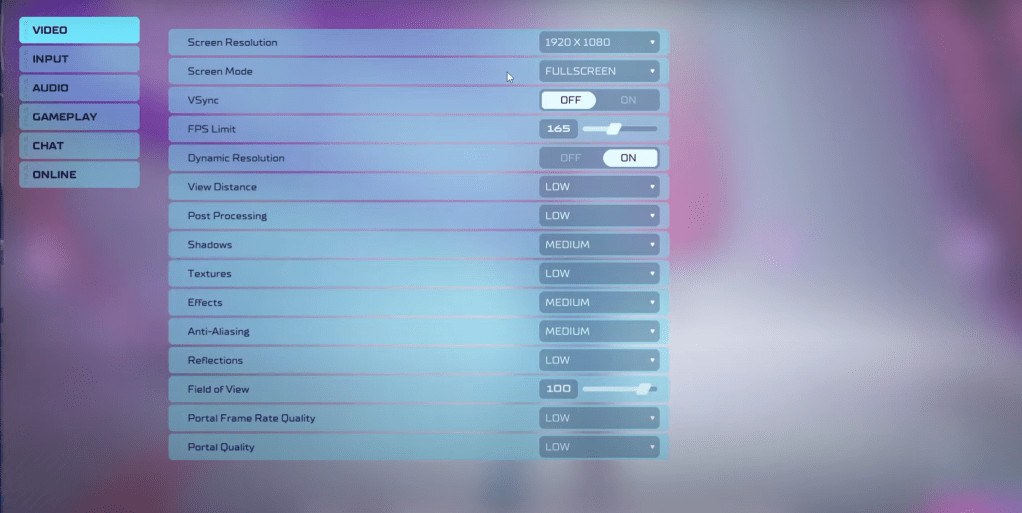
In a competitive shooter like Splitgate 2, performance trumps visual fidelity. The settings below prioritize smooth gameplay. Note that visuals may be less impressive than on higher settings.
- Screen Resolution: Monitor’s Native (1920×1080 is standard)
- Screen Mode: Borderless Fullscreen (for easy Alt+Tab), otherwise Fullscreen.
- VSync: Off (introduces significant input lag)
- FPS Limit: Monitor’s Refresh Rate (60, 144, 165, 240, etc.)
- Dynamic Resolution: On (experiment with Off; results vary by system)
- View Distance: Low
- Post Processing: Low
- Shadows: Medium (Low for older systems)
- Effects: Low
- Anti-Aliasing: Low (increase if shimmering is noticeable)
- Reflection: Low
- Field of View: Maximum (though increasing FOV may impact frame rate slightly. A small decrease might improve performance without significantly impacting visibility.)
- Portal Frame Rate Quality: Low
- Portal Quality: Low
Generally, prioritize the lowest settings. However, if the visuals are too poor, consider increasing Effects and Anti-aliasing—these settings have a relatively minor performance impact.
Other Recommended Splitgate 2 Settings
These settings don't directly boost FPS but enhance the overall experience:
- Sensitivity: Adjust to your preference; use online calculators to convert settings from other games.
- Audio: Lower in-game music volume to reduce distractions. Enable Windows Spatial Sound for improved audio cues.
These settings provide a strong foundation for optimal Splitgate 2 performance. Remember to experiment and fine-tune based on your specific hardware and preferences.
Related: 10 of the Most Fun Games to Play With Friends
 Latest Articles










 Latest Games