Home
Home  Navigation


In Ivy Road and Annapurna Interactive's Wanderstop, players take on the role of Alta, a weary fighter seeking solace and recovery in a magical forest where she manages a cozy tea shop. The enchanting setting draws a diverse clientele, some of whom request coffee, an item not typically on the menu. Here's a detailed guide on how to unlock and brew coffee in Wanderstop.
Which Customers Want Coffee in Wanderstop?
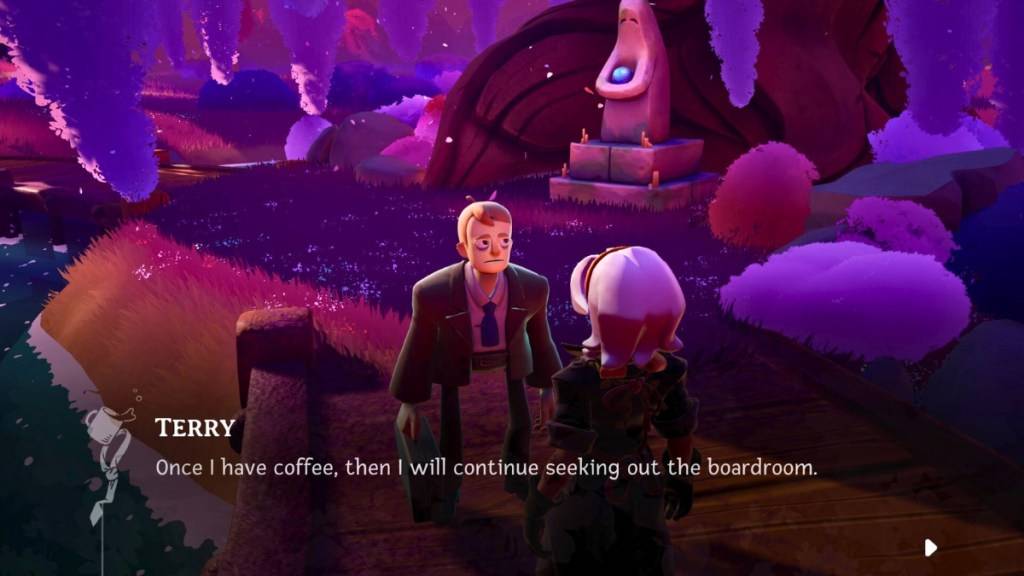
In the fourth cycle of Wanderstop, a stunning humanoid bird visits the shop, seeking a refined cup of tea. Following her visit, a trio of businessmen named Jerry, Larry, and Terry arrive, all dressed in suits and carrying briefcases, en route to a boardroom presentation. Despite Alta's warning that they are off-course, they decline her offer of tea, insisting on coffee. They decide to wait at the shop until coffee becomes available.
Boro, the tea shop's owner, explains that coffee has never grown in this forest, leaving Alta initially frustrated. The situation changes with the arrival of an interdimensional figure named Zenith, who is fascinated by the businessmen. Unlike them, Zenith is willing to try Alta's tea, marking their first experience with a beverage other than coffee.
Related: All 10 Echo Conch Owners and Locations in Hello Kitty Island Adventure
How to Unlock Coffee Beans in Wanderstop

To unlock coffee beans, prepare a cup of tea for Zenith using a valuable item such as a book, trinket, pot, mug, small plant, or photograph. After tasting the unique tea, Zenith becomes curious about the difference between coffee and tea and how to brew the former for the businessmen. Alta's mention of "coffee beans" sparks a revelation for Zenith.
Utilizing the Infinite Path, Zenith brings coffee beans to the forest, allowing them to grow in the clearing for the first time. Instructions for harvesting and brewing the beans are added to Alta's Field Guide.
How to Harvest and Brew Coffee in Wanderstop
Coffee beans now grow wild in the clearing and respawn randomly. Harvest them similarly to fruits and seeds, and store them in your ingredients pocket or carry them in your hand. They can also be placed on shelves, tables, floors, or the ground outside.
Before brewing, clean the beans using the dishwasher, which will deliver them to the tea room via dish trains. To brew coffee, pour water into the tea maker, heat it if required, and then kick the gear to pour the water into the infuser. A single bean is sufficient to brew coffee, though customers might request additional beans or other ingredients. After brewing, kick the gear again to pour the coffee into the kettle below, and then decant it into mugs for serving to customers, Boro, or Alta.
Offering coffee not only satisfies the businessmen but also delights Zenith and provides another beverage option for other customers. Even Boro is willing to give it a try, though he admits it's not to his taste.
That's how you unlock, harvest, and brew coffee in Wanderstop.
Wanderstop is available for PlayStation, Xbox, and PC via Steam.
 Latest Articles










 Latest Games